
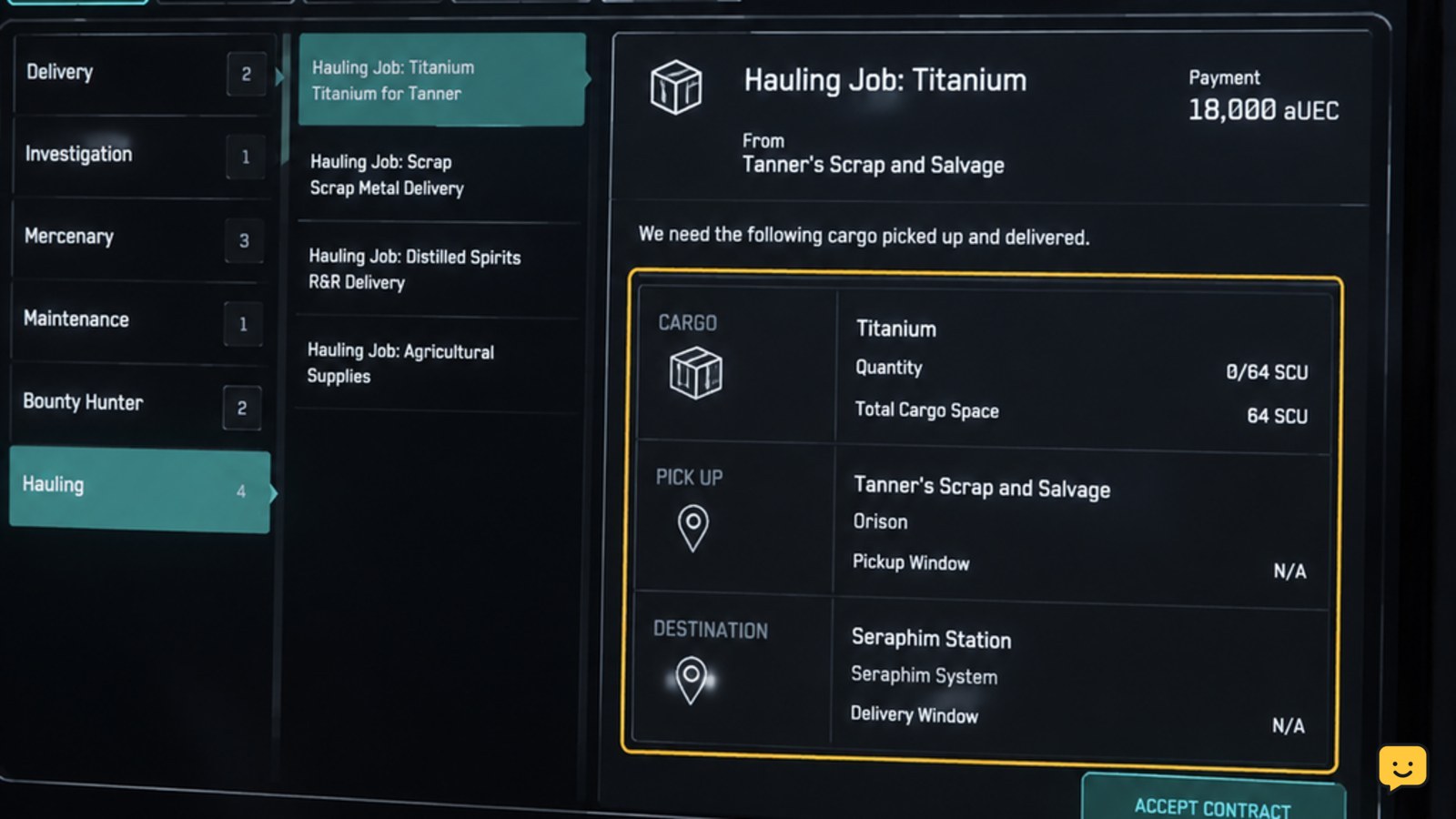
Open mobiGlas, enter the Contract Manager, and choose a Hauling contract whose cargo, pickup point, destination, and deadline fit your ship and route. Accept it, travel to the pickup location, use the available freight-elevator or cargo-loading workflow, and verify every required item is aboard. Deliver the shipment at the destination, unload it, then confirm the contract shows completed and the reward has been issued.
Browse more Star Citizen guides
Check the contract details before accepting
Open mobiGlas and select the Contract Manager. Browse the available Hauling contracts and open a candidate to inspect its requirements. The contract should identify the cargo type, quantity, pickup location, delivery destination, and any deadline or other restrictions.
Compare those details with your ship and planned route. A short route is usually easier for a first run, but the key decision is whether the cargo fits and both locations are practical for your current ship. If the contract requires more capacity than you have, leave it unaccepted and choose a smaller job.
Select Accept only after the route and capacity check. Reopen the accepted contract immediately and confirm it is listed as active. If it is not active, do not start loading; refresh the Contract Manager or move to another contract rather than treating an offer as accepted.
Reach the pickup point and prepare the cargo hold
Travel to the pickup location shown in the active contract. The location may require a landing, docking, or another access step before the freight service becomes available. Use your normal navigation route and confirm the destination marker matches the contract before committing to the approach.
Once on site, locate the available cargo-loading interface. Current hauling missions use the freight and cargo handling workflow at the assigned location rather than simply placing arbitrary items into the hold. Follow the on-screen interaction for the freight elevator or cargo service, then select the shipment associated with the active contract.
Load only the required cargo. If the interface shows a quantity, compare it with the contract before confirming. A successful load should produce an observable state change: the freight appears in the ship’s cargo area or ship cargo inventory, and the contract’s pickup objective advances. If neither occurs, stop and verify the cargo was assigned to this contract.
Verify every required item is aboard before departure
Before leaving the pickup location, inspect the ship cargo hold or ship cargo inventory. Confirm the cargo type and quantity match the active hauling contract. Do not rely on the physical appearance of a crate alone if the inventory view is available; the mission needs the correct tracked shipment, not merely an item that looks similar.
For help moving items between storage views, use the current local-to-ship inventory workflow described in Star Citizen’s local and ship inventory guide. The important checkpoint is that the required freight is registered to the ship you will fly.
Leave only when the pickup objective is complete or the cargo is clearly recorded as loaded. If the cargo is missing, the quantity is wrong, or the objective remains unchanged, return to the freight interface and check the contract assignment. If the item cannot be recovered or the contract has lost its cargo state, stop before departing and consider abandoning that run rather than risking the shipment elsewhere.
Deliver the cargo and confirm the payout
Fly to the contract’s delivery destination. Set the destination from the contract or Star Map and verify the arrival point before landing or docking. If quantum travel does not offer the expected location, recheck the exact destination name and make sure the ship is pointed toward a valid route; do not substitute a nearby location unless the contract identifies it as the delivery point.
At the destination, open the relevant cargo or freight interaction and unload the shipment for the active contract. Deliver the full required quantity unless the contract explicitly supports partial handling. The delivery objective should advance after the correct freight is accepted.
Return to the Contract Manager and check the final status. Successful completion means the contract is marked Completed or otherwise records a finished delivery, and the listed reward is credited. If the cargo disappears but the objective does not advance, do not load replacement goods or accept another hauling contract immediately. Recheck the destination, contract status, and delivery terminal first.
Fix a missing contract, cargo state, or completion update
If the contract is missing from the active list, refresh mobiGlas and confirm you are viewing active contracts rather than available offers. If the mission vanished after accepting it, treat that as a state or server problem until the game restores a clear status. Do not assume that arriving at the destination will still produce payment.
If cargo is not available at the pickup point, confirm the contract is active, the ship is at the correct location, and the loading interface is showing the mission shipment rather than personal inventory. If the required freight is present but will not load, leave the interface, re-enter it, and check the quantity again.
If delivery fails, compare the contract’s destination with the location where you landed and verify that all required cargo remains aboard. If the mission remains unresolved after the correct delivery action, stop the run and record the contract status before relogging or changing ships. A completed payout, not an empty cargo hold, is the final verification.
Frequently asked questions
Can I accept a cargo hauling mission with any ship?
No. Choose a ship that has enough usable cargo capacity and can reach the contract locations safely. The contract quantity is the deciding factor, so a ship that can fly the route may still be unsuitable if its hold is too small. Check the cargo requirement before selecting Accept.
How do I know the cargo was loaded for the mission?
The cargo should appear in the ship’s cargo area or ship cargo inventory, and the pickup objective should advance in the active contract. If you can see a crate but the contract still shows no progress, stop before departure and check the freight interface, item type, and quantity.
What should I do if the cargo delivery does not complete?
First confirm that you are at the exact destination named by the contract and that the full required shipment remains aboard. Use the destination’s cargo or freight interaction, then check the contract status. Do not assume completion until the contract records a finished delivery and the reward is credited.
Can I carry personal cargo with a hauling contract?
You can carry other items only when doing so does not reduce the space or handling needed for the contract shipment. Keep the mission freight identifiable and verify its quantity before departure. If the contract cargo cannot be loaded or tracked clearly, do not add unrelated items to the hold.


