
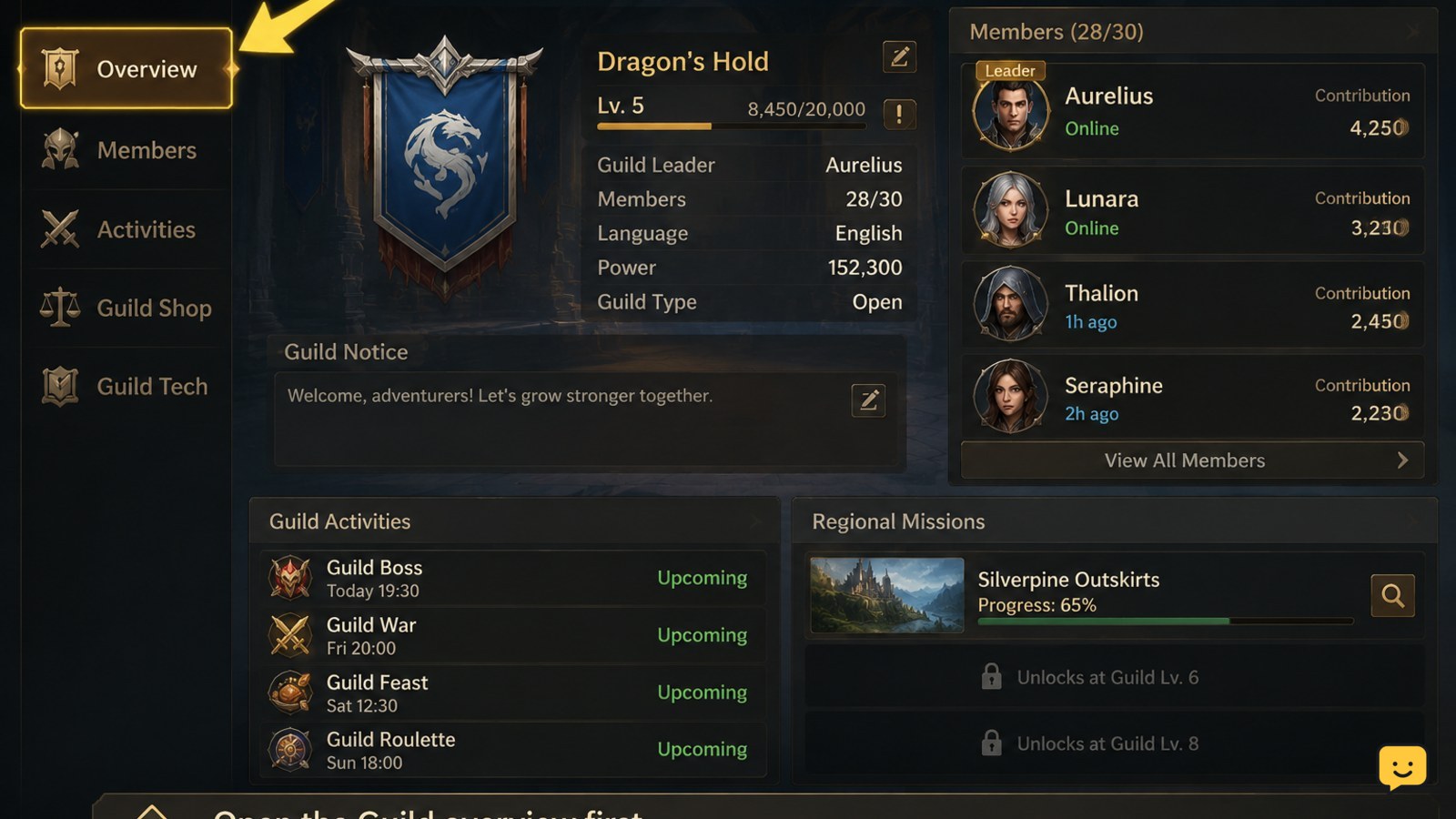
Open the Guild feature from the game’s main progression menus once it becomes available, then review the guild list or invitation options. Choose a group that matches your activity level, join only after checking its requirements, and complete the Guild tasks and Regional Missions shown in your client. Menu names, requirements, and rewards can change between updates.
Browse more DragonSword: Awakening guides
What the Guild feature is for
The Guild is Dragon Sword Awakening’s group-progression feature. Available references describe a Guild loop as part of early progression and also mention Regional Missions as a later activity to begin at the appropriate point. That means the Guild is more than a chat list: it can connect membership, shared activity, missions, and progression rewards.
The exact feature set can change with patches. Treat the buttons, requirements, contribution rules, activity limits, and reward previews in your current client as authoritative. If a guide or video uses a different layout, use it to understand the general purpose of the system rather than copying an old route.
How to access and join a Guild
- Open the main menu after completing the introductory objectives. Look for a button labelled Guild, or for a guild-related tab inside the progression, social, or activity interface.
- Read the access screen before selecting a group. Check whether the game shows a minimum level, approval requirement, open recruitment, language preference, activity expectation, or server restriction.
- Use the available list, search, recommendation, invitation, or application option. Prefer a group whose stated activity level matches your schedule.
- Read the confirmation window carefully. Confirm the guild name, entry requirements, application status, and any displayed cost before accepting.
- Return to the Guild overview after joining. Your name, rank, member status, or guild progress should be visible before you begin an activity.
If the game does not show a join button, the feature may still be locked, the group may be full, or the guild may require an application. Do not repeatedly select a disabled control; first inspect the requirement text.
How to choose the right group
A high-level guild is not automatically the best choice for a new account. Look for a group that explains its expectations clearly and has activity goals you can realistically meet. A casual guild is often better than an inactive top-ranked guild if you want reliable participation and communication.
- Compare the member count and recent activity indicators if the game displays them.
- Check whether applications are accepted automatically or require approval.
- Read the description for daily or weekly participation expectations.
- Confirm that the guild’s time zone, language, and play schedule suit you.
- Avoid groups that request unverified payments, account details, or access outside the game.
Guild membership should never require you to share your game password, recovery codes, or payment credentials with another player. Use only the game’s own membership and application controls.
How to participate after joining
Start with the activities currently listed in your Guild interface. Because the available objectives and reward rules may change, the task description matters more than a fixed checklist from an older guide.
- Open the Guild activity or mission page and read the objective, progress counter, reset time, and reward preview.
- Prioritize objectives that overlap with content you already plan to play. This avoids spending resources solely to increase a guild counter.
- Complete the required activity, then return to the Guild screen and check that progress increased.
- Claim each available reward through the displayed claim button. Some rewards may remain unclaimed until you manually collect them.
- Review the Guild overview again before logging out so you know whether another task, donation, or mission is available.
If the Guild includes Regional Missions in your current version, open their requirements before starting. Confirm the region, objective type, participation limit, and reward before committing a run. For combat preparation, test your current class skills in ordinary content first; the class-skills guide can help you review cooldowns and Signal Skill chains without risking an important attempt.
Guild contributions and resource decisions
Guild systems commonly present several ways to contribute, but the evidence available for Dragon Sword Awakening does not establish a complete, permanent list of donation types or costs. Use the current Guild screen to distinguish free participation from optional resource contributions.
- Read the full contribution description, including the amount requested and the progress it provides.
- Compare the personal reward with the resource’s other uses, such as gear, class progression, or dungeon preparation.
- Contribute only when the amount and result are clearly displayed.
- Record or screenshot the confirmation if the game uses a limited daily or weekly allowance.
- Check the Guild log or progress bar afterward to verify that the contribution registered.
Do not assume that the largest contribution is the most efficient one. A small repeatable task may provide better value for a developing account than a one-time purchase or a resource needed for core upgrades.
How to verify Guild progress and rewards
Use three checks after every important Guild action. First, confirm that your membership status appears on the overview. Second, confirm that the activity counter or guild progress changed. Third, open the rewards page and verify that the item was claimed or added to the appropriate inventory.
If the reward is not visible, check mail, the Guild reward tab, inventory filters, and any separate currency balance. Then restart the game normally and inspect the same pages again. Do not repeat a paid contribution while the first transaction is unresolved.
Guild problems and safe fixes
- Guild is missing: finish the next visible story or tutorial objective, restart the game, and check for a pending update.
- Join request fails: reread the requirement, check whether the guild is full, and try another open group. Stop if the client gives no reason and the problem affects every guild.
- Application is pending: wait for the guild’s approval process or cancel the request before applying elsewhere if the interface requires one active application.
- Activity does not count: confirm that you started the exact mission shown on the Guild page and that its reset period has not ended.
- Reward is missing: check claim status, mail, inventory filters, and currency balances. Contact the game’s official support if a confirmed claim remains absent.
Do not use third-party tools, account sharing, or unofficial services to force Guild access or recover a missing reward. Stop when the client or official support requires account verification.
Best first Guild routine
- Open the Guild page when you start a session.
- Read the available task and its reset timer.
- Choose an objective that matches your planned story, combat, or dungeon play.
- Complete the activity without spending resources you need for character progression.
- Return to the Guild page, verify progress, and claim the reward.
- Check Regional Missions only when their requirements and timing are clear in your version.
This routine keeps Guild participation useful without turning every session into a resource sink. Recheck the activity list after major updates because the interface and reward structure may change.
Frequently asked questions
When does the Guild unlock in Dragon Sword Awakening?
The available sources confirm that Guild progression is part of the early game, but they do not establish a permanent level or quest number. Complete the introductory progression and check the main menus after each major tutorial objective. If Guild remains unavailable, update the client and inspect the requirement text rather than relying on an old level claim.
How do I join a Guild in Dragon Sword Awakening?
Open the Guild interface, browse or search the available groups, review the requirements and activity expectations, then select the displayed join or application option. Confirm the guild name and any listed cost before accepting. Return to the overview afterward and verify that your membership status is shown.
What should I do in a Dragon Sword Awakening Guild?
Open the current Guild activity page and complete the objectives shown there. Prioritize tasks that overlap with content you already intend to play, then return to verify progress and claim rewards. Regional Missions may also appear when available in your version, so read their region and objective requirements first.
Why can’t I join a Guild?
The Guild may still be locked, the group may be full, applications may require approval, or your account may not meet a displayed requirement. Read the error text, try an open group, and restart after confirming the game is updated. Stop if every group fails and the client provides no explanation.
Should I spend resources on Guild contributions?
Only contribute when the game clearly shows the amount required, the progress gained, and the reward. Compare that cost with your immediate character, gear, and dungeon needs. Avoid unverified purchases or large contributions, especially when the reward cannot be confirmed in the current Guild interface.


